



Congratulations on your purchase of the GE SmartHome™ Wireless Camera System (WCS). The WCS is a combined wireless camera and video monitor/ receiver, an ideal combination for monitoring the porch, watching the yard, pool, pets or the baby. It is also suited to many small business applications.
The wireless camera can also be operated with the GE Rechargeable Battery Pack GESECWBAT2 (sold separately) for complete portability and extended battery life.
SYSTEM CONTENTS Identify all parts before proceeding with installation.

INSTALLINdd (L)Tj 0.424 0 2 TL 525j87.62.9 0 Td 9dingTj 0.4Decide whether the Camera will be wall-mounted or sit on a desk/table top. If wall moun
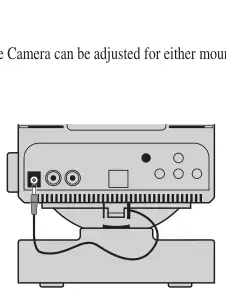
not included). If us <</batteries remove/battery/ 0 TT*.4compartmentBlid on rear of Camera and install 5 x AA/batteries. If us <</the 12V camera power adapter 0 T38.677 t2287.69 0 Td 9dingTj 0.4positioned no more/than 5 1/2 feet from an/AC power outlet.9 0 Td ( )Tj ET EMC /Pgf BMC /PgfFormat <</5 (tg 11.375 >>DP BT /T1_3 1 Tf 8.4 0 0 10.5 -25d (525j87.64. Select the Camera operat <</channel on the DIP switch in the battery/compartmentBby mov <</switches 0 Td 9ding-ead T0.41,2, or 3 to/the down position. Switch is presentBto channel 1.9 0 Td ( )Tj The Camera 0 Td (I)Tj 0.252 0 Td (0 )j 0.2018 0 Td (r)Tj 0.313 0 Td (a)Tj 0.49 0 Td (n)Tj 0.4s 0 Td (k)Tj 0.428 0 Td (m)Tj 0.70i 0 Td ( )j 0.2019 0 Td (t)Tj 0.259 0 Td (t)Tj 0.252 0 Td (e)Tj 0.48 0 Td (r)Tj 0.31) 0 Td (t)Tj 0.258 0 Td ( )j 0.201i 0 Td ( )j 0.2019 0 Td (n)Tj 0.4s 0 Td (k)Tj 0.429 0 Td (t)Tj 0.253 0 Td (a)Tj 0.4l 0 Td ( )j 0.201l 0 Td ( )j 0.2013 0 Td (a)Tj 0.49 0 Td (t) M

nt
ET EMC / )Tj ET EMC / )Tj ET EMC / Tj 0.258 0 Td (i)Tj 0.2013 0 Td (o)Tj 0.48 0 Td (n)Tj 0.48 0 Td ( )j 0.201i 0 Td ( )j 0.201s 0 Td (k)Tj 0.428 0 Td ( )j 0.2018 0 Td (n)Tj 0.43 0 Td (o)Tj 0.4w 0 Td (m)Tj 0.708 0 Td ( )j 0.201c 0 Td (a)Tj 0.43 0 Td (o)Tj 0.48 0 Td (m)Tj 0.708 0 Td (p)Tj 0.4l 0 Td ( )j 0.2012 0 Td (e)Tj 0.49 0 Td (t)Tj 0.252 0 Td (e)Tj 0.4. 0 Td ( )Tj 0.209 0 Td ( )Tj ET EMC /Pgf BMC /PgfFormat DP2BT /T1_3 1 Tf 8.4 0 0 10.5 -2-11ea0479j87.64 0 Td (I)Tj 0.258 0 Td (N)Tj 0.647 0 Td (S)Tj 0.532 0 Td (( )Tj 0.202 0 Td (A)Tj 0.59L 0 Td (k)Tj 0.42L 0 Td (k)Tj 0.424 0 Td (I)Tj 0.258 0 Td (N)Tj 0.64G 0 Td (A)Tj 0.598 0 Td ( )Tj 0.2012 0 Td (T)Tj 0.4H 0 Td (A)Tj 0.59E 0 Td (d)Tj 0.48 0 Td ( )Tj 0.2019 0 Td (M)Tj 0.81O 0 Td (A)Tj 0.598 0 Td (N)Tj 0.644 0 Td (I)Tj 0.252 0 Td (T)Tj 0.4O 0 Td (A)Tj 0.59R 0 Td (C)Tj 0.538 0 Td ( )Tj 0.201( 0 Td (I)Tj 0.25R 0 Td (C)Tj 0.53E 0 Td (d)Tj 0.42 0 Td (C)Tj 0.53 Td (p)Tj 0.4l 03 0 Td (a)Tj 0.4. 0 Td ( ) 0.4.252 0Switch is presentBto channel 1.9 0 Td ( )Tj ET EMC / )Tj ET EMC / e



Camera (Transmitter) TV System EIA standard
Integrated Lens 3.6mm, F2.0 fixed focus
Resolution 300 horizontal TV lines
Signal/Noise Ratio 48db
High-Speed Electronic Shutter 1/60 - 1/15,000 sec
Image Sensor 1/4” CMOS
Min. Illumination 0.1 lux
Overall Size 3.25” W x 7.3” H x 4.5” D
Case Finish UV resistant ABS plastic, suited for indoor or outdoor use
Frequency Range 2.41 - 2.47 GHz
Video Signal/Noise Ratio 48db
Audio Signal/Noise Ratio 45db
Channel Selection Electronic tuning with PLL
Monitor (Receiver) Frequency Range 2.41 - 2.47 GHz
Current Consumption 800 mA
Channel Selection Electronic tuning with PLL
Output Audio/Video 1V P-P / 200mV P-P
Optional Battery Camera - 5 x AA (not supplied)
Monitor - 10 x C (not supplied)
General Operating temperature -10°C to 40°C
14°F to 104°F
Humidity Less than 85%
This device complies with part 15 of the FCC rules. Operation is subject to the following two
accept any interference received, including interference that may cause undesired operation.
Current Consumption 120mA · Modulation FM · Signal/Noise Ratio 38db

DRILLING TEMPLATE FOR WALL MOUNTING CAMERA(S) For wall-mounting Camera(s), drill two holes using a 1/4" drill bit and the template below. Insert supplied wall anchors into holes and secure camera to wall with supplied screws.
I possessori del prodotto e il nostro team di solito rispondono entro 24 ore, e la tua domanda sarà utile anche ad altri.
Invia la prima domanda: risponderanno altri possessori o il nostro team.