



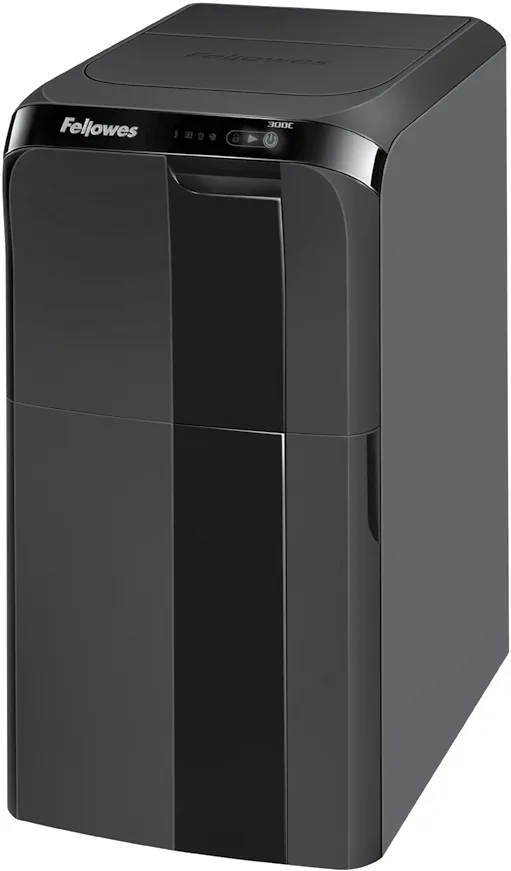


TM 300C/500C


Please read these instructions before use. Do not discard: keep for future reference. Lire ces instructions avant utilisation. Ne pas jeter : conserver pour référence ultérieure.
Läs dessa anvisningar innan du använder apparaten. Släng inte bort, behåll för framtida bruk.
Παρακαλείσθε να διαβάσετε αυτές τις οδηγίες πριν χρησιμοποιήσετε το προϊόν. Μην τις απορρίψετε: κρατήστε τις για μελλοντική αναφορά.
Læs venligst denne vejledning før anvendelse. Bør ikke bortskaffes. Behold for fremtidig henvisning.
Kullanmadan önce lütfen bu talimatları okuyun. Atmayın: ileride başvurmak üzere saklayın.
Lea estas instrucciones antes de usarlo. No las deseche: guárdelas para tenerlas como referencia.
Lue nämä ohjeet ennen käyttöä. Älä hävitä: säilytä myöhempää käyttöä varten.
Před použitím si pročtěte tyto pokyny. Nelikvidujte: uschovejte pro budoucí použití.
Diese Anleitungen vor Gebrauch genau durchlesen. Bitte nicht entsorgen: Zur späteren Bezugnahme aufheben.
Vennligst les nøye igjennom denne bruksanvisningen før bruk. Ikke kast den: Ta vare på den for senere referanse.
Pred použitím si prečítajte tieto pokyny. Nezahadzujte: odložte pre budúce použitie.
Kérjük, hogy használat előtt olvassa el az utasításokat! Az utasításokat ne dobja ki; tartsa meg referenciaan- yagként való jövőbeni használatra.
Przed użyciem proszę zapoznać się z tą instrukcją. Nie wyrzucać - zachować jako źródło informacji na przyszłość
Prima dell’uso, si raccomanda di leggere questo manuale di istruzioni. Conservare il manuale per consultarlo secondo le necessità.
Leia estas instruções antes da utilização. Não as deite fora: conserve-as para consulta futura.
Перед началом эксплуатации обязательно прочтите данную инструкцию. Не выбрасывайте данную инструкцию: сохраните ее для последующего использования.
Deze instructies voor gebruik lezen. Niet weggooien, maar bewaren om later te kunnen raadplegen.

D.

A.
E.
B.
A. Control Panel (see below) B. Shredder Drawer C. Casters D. Disconnect Power Switch 1. OFF 2. ON
E. See Safety Instructions (inside drawer) F. Bin Door G. Bin (inside)
F.
G.

*300C does not include time delay feature.
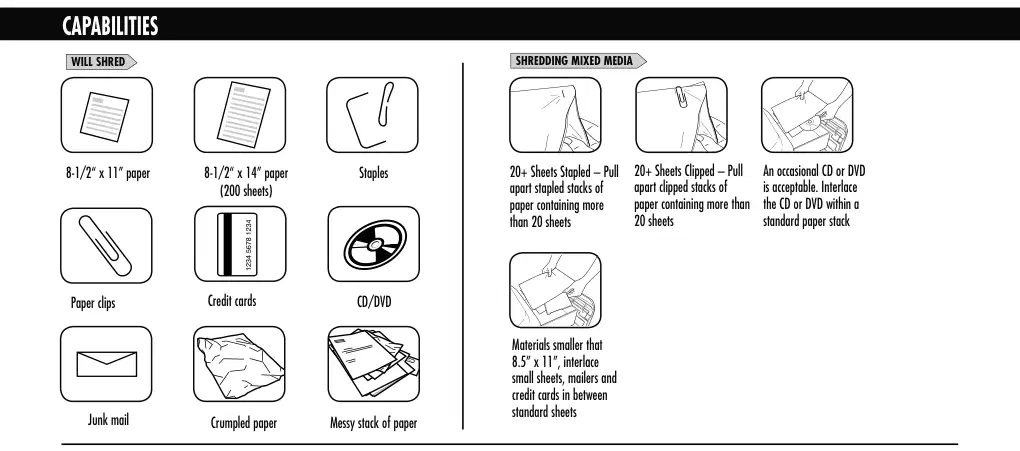
8-1/2“ x 11” paper 8-1/2“ x 14” paper (200 sheets)
20+ Sheets Stapled – Pull apart stapled stacks of paper containing more than 20 sheets
20+ Sheets Clipped – Pull apart clipped stacks of paper containing more than 20 sheets
An occasional CD or DVD is acceptable. Interlace the CD or DVD within a standard paper stack
Materials smaller that 8.5” x 11”, interlace small sheets, mailers and credit cards in between standard sheets
Will not shred: Adhesive labels, continuous form paper, bound documents, transparencies, newspaper, cardboard, binder clips, industrial staples, more than 20 pages stapled together, laminates, 3½ in. Floppies, file folders, X-rays or plastic other than noted above
Maximum: 500C Paper Capacity (8.5 in. x 11 in. paper) 500* 300C Paper Capacity (8.5 in. x 11 in. paper) 300* * A4 (70 g) paper at 220-240V, 50/60 Hz, 4.0Amps; heavier paper, humidity or other than rated voltage may reduce capacity.
Paper shred size: Cross-Cut 4mm x 38mm

t 0QFSBUJPO NBJOUFOBODF BOETFSWJDFSFRVJSFNFOUTBSFDPWFSFEJOUIFJOTUSVDUJPO
manual. Read the entire instruction manual before operating shredders.
Do not place near or over heat source or water.
t 5IJTTISFEEFSIBTB%JTDPOOFDU1PXFS4XJUDI % UIBUNVTUCFJOUIF0/(I)
to off or unplug when not in use.
position to operate shredder. In case of emergency, move switch to OFF (O) position. This action will stop shredder immediately.
t ,FFQGPSFJHOPCKFDUToHMPWFT KFXFMSZ DMPUIJOH IBJS FUDoBXBZGSPNTISFEEFS
voltage and amperage designated on the label. The grounded outlet or socket NVTUCFJOTUBMMFEOFBSUIFFRVJQNFOUBOEFBTJMZBDDFTTJCMF&OFSHZDPOWFSUFST transformers, or extension cords should not be used with this product.
products on or near shredder. Do not use canned air on shredder.
feed arms.
Open drawer and add paper Plug in and put disconnect power switch in ON (I) position
Press ( ) ON to activate
Press start ( ) to begin shredding. Drawer will lock automatically
After turning the disconnect power switch on, the shredder will run through a start up cycle before ready for use.
JamGuard System™ Prevents shredding interruptions GPSKBNGSFFPQFSBUJPO
SmartLock™ Engages with each shred cycle to protect confidential information
Energy Saving Sleep Mode Feature shuts down the shredder after 2 minutes of inactivity

Shredder will automatically reverse paper and Remove Paper icon will illuminate
Lock icon will turn off and shredder drawer will unlock
Separate shredded stack, turn stack around so clean, un-shredded edge goes into drawer first
Engages with each shred cycle to protect confidential information
Feature shuts down the shredder after 2 minutes of inactivity
Smart Lock automatically engages. Drawer will lock and Lock icon on control panel will illuminate
8IFOTISFEKPCJT complete, Lock icon will turn off and shredder drawer will unlock
To get out of sleep, open drawer and load paper
For more information about all of Fellowes Advanced Product Features go to www.fellowes.com

Allows you to delay shredding for 30, 60 or 90 minutes.
Open drawer and add paper
Close drawer and press clock icon on control panel
Press once for 30 minute delay (one LED will illuminate)
Press twice for 60 minute delay (two LEDs will illuminate)
Press three times for 90 minute delay (three LEDs will illuminate)
Press four times to reset clock
**To cancel Delayed Start, press and hold Clock icon for 2 seconds
Overheat Indicator: When the Overheat Indicator is illuminated, the shredder has exceeded its maximum operating temperature and needs to cool down. This indicator will remain illuminated and the shredder will not operate for the duration of the recovery time.
Drawer/Bin Door Open: The shredder will not run if the bin is open. When illuminated, close the bin to resume shredding.
Remove Paper: When illuminated, see Paper Jam section under Advanced Product Features.
If a critical situation occurs while SmartLock™ is engaged and the shredder drawer needs to be accessed, follow the steps below.
In case of a power outage, SmartLock™ will remain engaged. Once power is restored, shred cycle will automatically resume.
The service hatch will begin to rise. ,FFQUVSOJOHVOUJM the hatch panel is easily removed from the top of the machine.
To replace the service hatch, position hatch panel back on top of the machine. Hold panel in place while turning the allen wrench clockwise until you feel resistance.
Locate the access screw on the back of the machine and turn counter clockwise with a 6mm allen wrench.
* Shredder will not run if the hatch is not in place. Always replace the hatch to resume shredding.

Limited Warranty: Fellowes, Inc. (“Fellowes”) warrants the parts of the machine to be free of defects in material and workmanship and provides service and support for 2 years from the date of purchase by the original consumer. Fellowes warrants the cutting blades of the machine to be free from defects in material and workmanship for 20 years from the date of purchase by the original consumer. If any part is found to be defective during the warranty period, your sole and exclusive remedy will be repair or replacement, at Fellowes’ option and expense, of the defective part. This warranty does not apply in cases of abuse, mishandling, failure to comply with product usage standards, shredder operation using an improper power supply (other than listed on the label), or unauthorized repair. Fellowes reserves the right to charge the consumers for any
additional costs incurred by Fellowes to provide parts or services outside of the country where the TISFEEFSJTJOJUJBMMZTPMECZBOBVUIPSJ[FESFTFMMFS"/:*.1-*&%8"33"/5: */$-6%*/(5)"50' .&3$)"/5"#*-*5:03'*5/&44'03"1"35*$6-"3163104& *4)&3&#:-*.*5&%*/%63"5*0/ TO THE APPROPRIATE WARRANTY PERIOD SET FORTH ABOVE. In no event shall Fellowes be liable GPSBOZDPOTFRVFOUJBMPSJODJEFOUBMEBNBHFTBUUSJCVUBCMFUPUIJTQSPEVDU5IJTXBSSBOUZHJWFTZPV specific legal rights. The duration, terms, and conditions of this warranty are valid worldwide, FYDFQUXIFSFEJGGFSFOUMJNJUBUJPOT SFTUSJDUJPOT PSDPOEJUJPOTNBZCFSFRVJSFECZMPDBMMBX'PS more details or to obtain service under this warranty, please contact us or your dealer.
Pagine di riferimento in questo manuale: produttore, supporto e download.
I possessori del prodotto e il nostro team di solito rispondono entro 24 ore, e la tua domanda sarà utile anche ad altri.
Invia la prima domanda: risponderanno altri possessori o il nostro team.